
Spring 2022 Resources
Digital Marketing Glossary
A/B testing – a method in marketing research where variables in a control scenario are changed and the ensuing alternate strategies tested, in order to improve the effectiveness of the final marketing strategy.
Above the fold – the section of a Web page that is visible without scrolling.
Call to action (CTA) – the part of a marketing message that attempts to persuade a person to perform a desired action.
Click-through – the process of clicking through an online advertisement to the advertiser’s destination.
Click-through rate (CTR) – The average number of click-throughs per hundred ad impressions, expressed as a percentage.
Contextual advertising – a method of serving advertisements based on the content (i.e., overall context or theme) of a web page.
Conversion rate – the percentage of visitors who take a desired action.
Cookie – information stored on a user’s computer by a website so preferences are remembered on future requests.
Cost per action (CPA) – online advertising payment model in which payment is based solely on qualifying actions such as sales or registrations.
Cost per click (CPC) – the cost or cost-equivalent paid per click-through.
Cost per lead (CPL) – online advertising payment model in which payment is based on the number of qualifying leads generated.
CPM – cost per thousand impressions.
Crawler (Spider, Bot, Robot) – Tools used to explore pages on the internet.
Geo-fencing – delivering ads to consumers within a specific boundary or “fence” (historical).
Geo-fencing micro proximity – geo-fencing in real time.
Geo-targeting – delivering ads to consumers based on their geographical location (historical).
Impression – a single instance of an online advertisement being displayed
Index – A large database where HTML versions of pages that the crawler has found are saved.
Keyword – used in digital marketing to describe a word or a group of words an Internet user uses to perform a search in a search engine or search bar.
Meta tags – tags to describe various aspects about a Web page, including the title and description you see in search engine results.
Organic search – the unpaid entries in a search engine results page that were derived based on the content's relevance to the keyword query.
Pay per click (PPC)/Search Engine Marketing (SEM) – online advertising payment model in which payment is based solely on qualifying click-throughs.
Schema – also "structured data;" code that you can add to your HTML to improve the way search engines read and represent your page on search engine results pages. This code tells search engines more about what kind of content is on your page, ie articles, recipes, events, reviews, FAQs and more.
Search engine optimization (SEO) - the practice of optimizing a website so that it appears higher in search results.
Title tag – HTML tag used to define the text in the top line of a Web browser, also used by many search engines as the title of search listings.
Website traffic – the amount of visitors and visits a Website receives.
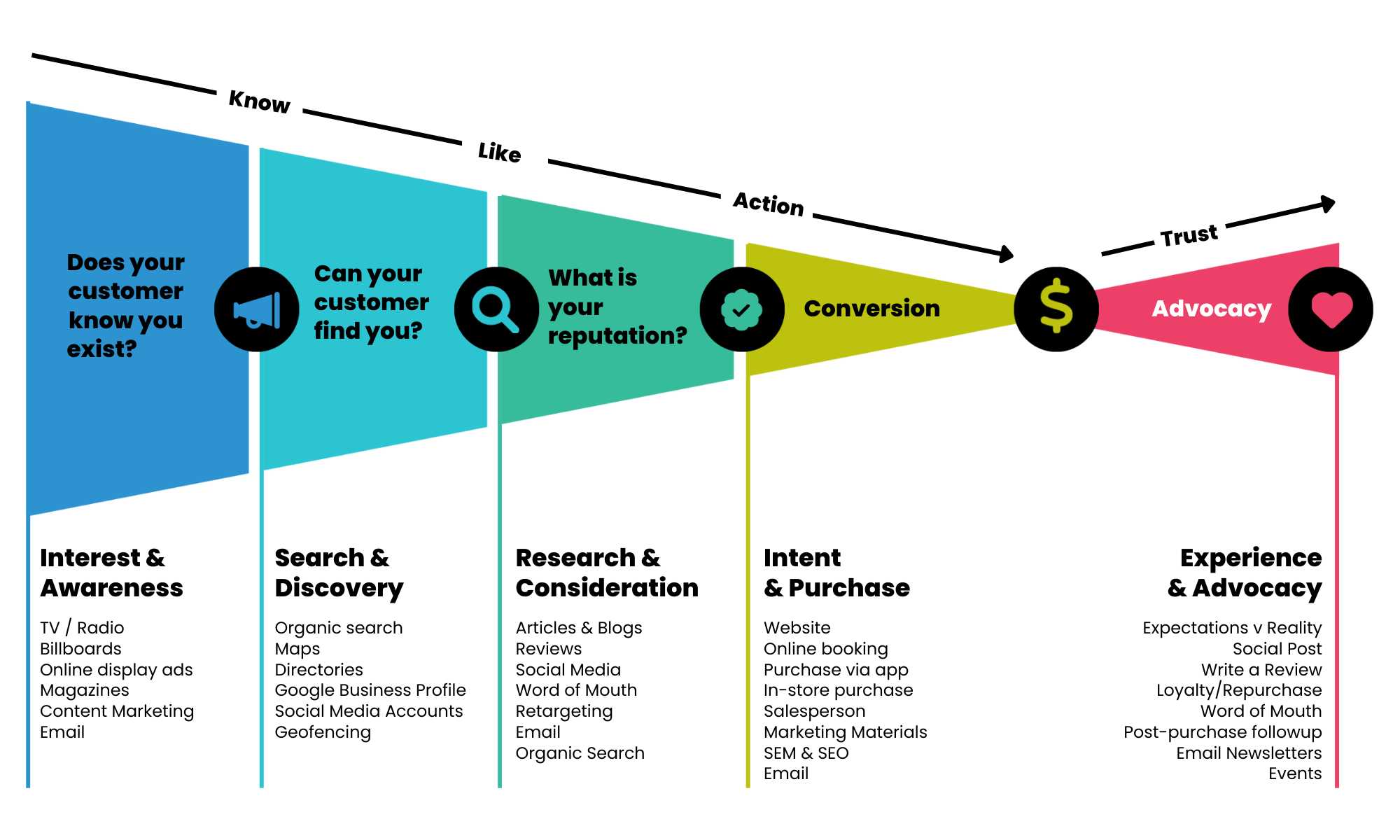
Pairing Customer Journey with Marketing Strategies
Organic SEO
Increase your position in search engine results and drive more website traffic with Organic SEO
Organic SEO Stats for businesses:
91.5%: is the average traffic share by sites on the first page of Google search engine results pages
60% of Google searches are done via mobile devices
46% of all searches are seeking local information
40% of revenue is captured by organic search traffic
Organic SEO is perfect for any business with a website that is looking to compete for online visibility in search engine results to drive new website traffic and conversions.
Organic SEO Features
- Content creation such as webpage expansions or blogs to improve keyword visibility
- Technical SEO work including backlink acquisition, meta tag optimization, and indexation to align website foundation with search engine best practice
- Monthly reporting on organic metrics and keyword rankings
Organic SEO Benefits
- Drive organic traffic which accounts for ~66% of clicks from search engines
- Increase keyword rankings and attract new site visitors
- Increase revenue by generating more qualified leads
- Support your other digital marketing efforts
How to Improve Your Digital Footprint
How visible is your business online? New privacy compliance rules are shaping how you can serve ads and content to your customers. These changes will affect your social media accounts, emails, your website and more. How can you prepare your business to stay ahead of the curve?
1. Create (and Update) Your Google Business Profile
Why you need to create your Google Business Profile
Creating this free profile is one of the best and easiest ways to increase your visibility across Google services. Information from your Google Business Profile may appear in Google Search, Google Maps, and Google Shopping.
By having a Google Business Profile, you can connect with customers, post updates, list your products and services, accept online orders, and more. Your business will appear in the top right of Google search results when customers type in your business name.
How to Set Up Your Google Business Profile:
- Log into the Google account you wish to be associated with your business, or create a Google account if you don’t already have one. A Google account can be created by clicking on “Create account” at accounts.google.com.
- Go to https://www.google.com/business/ and enter the name of your business.
- You'll be asked a series of questions about your business and also go through an address verification process.
- Read through Google's documentation for FAQs and tips on how to maximize this resource: https://www.google.com/business/faq/
Need help? Triangle Digital Partners offers Local SEO packages to help set up, improve and maintain your Google Business Profile. Reach out to us at rory.gillis@triangledigitalpartners.com.
2. Audit Your Overall Visibility
In addition to setting up and/or updating your Google Business Profile, make sure your information is accurate and visible wherever else you are online. If you're not already visible on these platforms, claim your accounts. Even if you don't plan to use a particular platform regularly, it's important for your profiles to point back to the platforms you are using regularly, like your website or Facebook page.
- Make sure you have access to all of your social platforms:
- YouTube
- etc.
- Wherever they appear online, ensure your Name, Address, Phone (NAP) are consistent.
- Are your business hours up to date everywhere?
- Are your products/services/menu up to date everywhere?
3. Set up Google Analytics 4
Why you need to set up Google Analytics 4
Google Analytics is a free tool that connects to your website to measure customer activity. Google Analytics 4 (GA4 for short) is the latest version of this tool and will be completely replacing all current versions on July 1, 2023. The new version is more privacy-focused and uses more intelligent machine learning models to show insights about customer journey across multiple platforms and devices. Read Google's announcement to learn more.
What this means for you:
If you are already using Google Analytics, you will need to add a GA4 property to your existing set up. There is no "migration" process—old information will NOT be migrated into the new GA4 property—so the sooner you set this up, the more traffic history you will have on your website. You can use Google's help doc on how to add a GA4 property to your existing account.
If you don't already have a Google Analytics account, you can follow this link to set up your account. Google has a wizard to help you with the setup process.
In both cases, you'll want to be in touch with someone who has access to the backend of your website to be able to insert the piece of code that connects Google Analytics to your website.
4. Capture Customer Information
With the deprecation of the cookie in 2023, marketers will not be able to rely on demographic and behavior targeting to reach your intended customers. Instead, you'll be able to use contextual-based advertising, where you can target the types of content and websites your ads appear on.
In addition to contextual-based advertising, it will be more important than ever to collect information about people who are interacting directly with your brand. The best way to do this is by collecting email addresses.
How to collect email addresses
When designing your display advertising campaign, you want to think about the Most Wanted Action (MWA) you want your customer to take. Once you have this goal, you can design an effective ad with a corresponding Call-to-Action (CTA) and the marketing copy for the landing page (Click-Through URL or CTURL). Here is an example of an effective landing page that collects email addresses: https://claritylegalgroup.triangleclicks.com/
A landing page should:
- Begin with a benefit-oriented headline.
- Use clear, relevant, and concise copy.
- Focus on getting visitors to take one specific action.
Avoid options, or the conversions will suffer. - Remove distracting navigational links.
No menus, no clutter. Make it impossible for the visitor to ignore your message or get distracted. - Make the form or checkout option prominent.
If the page is long, include this section several times. This is where you are collecting email addresses and other important information about your customers. - Maintain your brand.
Make your landing page look the same as or similar to your overall website and brand. Keep the same colors, font, and overall look and feel of the main site to reinforce brand awareness.
Need help? Triangle Digital Partners offers Landing Page design and hosting. Reach out to us at rory.gillis@triangledigitalpartners.com.